Hear Through Walls
- 4.4
- Rating
- 50.00K
- Installs
- Free
- Price
 Analysis by App-foxy
I approached Hear Through Walls as a very focused medical-category listening app rather than a replacement for a hearing aid or a professional diagnostic tool. Its central idea is simple: use a phone as a listening device that can pick up nearby sound and bring it closer to the user through headphones. That sounds impressive in a store summary, but the real question is what this capability feels like during an ordinary day, where it helps, and where the physical limits of phone microphones become impossible to ignore.
My overall impression is that the app is most interesting as an accessibility and awareness tool. It can make faint nearby sounds easier to notice when the phone is placed thoughtfully and the listening environment is reasonably quiet. It is much less convincing if you expect a phone to behave like a specialized wall-listening instrument. The distinction matters, because a useful listening aid and a device for secretly monitoring people are not the same thing. I would only use it openly, with respect for privacy and local law.
What the listening capability really offers
The developer behind the app is Battery Stats Saver, and the product is free to install, with optional in-app purchases shown from $0.99 to $99.99 per item. It is intended for Everyone, runs on Android from version 8.0 onward, and the current release is 17.1.0. Those details make it accessible to a broad range of Android users, although the age rating should not be mistaken for a promise that every listening situation is appropriate for every person.
You May Also Like

 Blood Strike: 2.5 Anniversary
Blood Strike’s Loadouts Turn Every Drop Into a Tactical Gamble
A close look at Blood Strike’s custom loadouts: how fast access to signature weapons reshapes its battle royale rhythm, rewards preparation, and narrows the gap between fights.

 Pandora - Music & Podcasts
Pandora’s Music Is Easy to Start, but Harder to Recover
Pandora’s strength is its low-effort path from a seed to a station. Its weak spot is how much confidence it asks you to place in connection, setup, and quiet recovery.

 8 Ball Pool
 Is Built on Rivalries, Rematches, and Routine
A close look at the rivalries, rematches, shared routines, and unanswered safety questions that turn a quick pool match into a persistent mobile community.

 Samsung Music
’s Quiet Strength Is Playing What You Already Own
Its reach comes less from spectacle than from dependable access to a personal library. That simplicity is both the app’s strongest retention engine and its ceiling.

 AccuWeather: Weather Radar
AccuWeather Review: A Quick, Clear Forecast for Everyday Decisions
For everyday plans, the best forecast is the one you can understand quickly. AccuWeather makes rain timing, radar, and local conditions easy to act on, with a few trade-offs.

 Hill Climb Racing
Why Hill Climb Racing Still Turns Crashes Into One More Run
A tiny car, a bumpy hill and one more upgrade: Hill Climb Racing keeps resurfacing because its simple chaos makes every near-miss feel personal.
More From Our News Desk
View All News


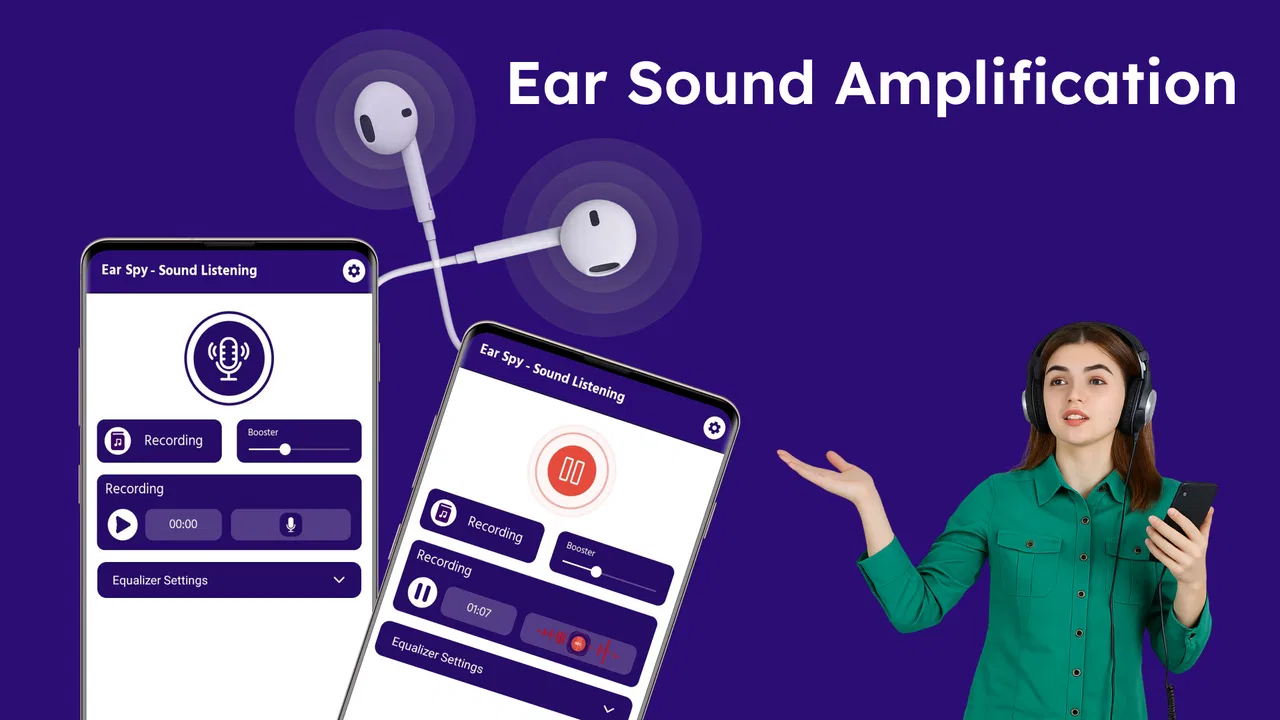
The strongest part of the concept is not “hearing through walls” in a literal, cinematic sense. A phone microphone cannot normally turn a solid wall into a transparent surface. What it can do is capture sound that reaches the microphone, then let you monitor that sound through connected headphones. A thin partition, a nearby room, or a quiet environment may produce something noticeable. A thick wall, distance, traffic, or several conversations can reduce the result dramatically.
I found it more helpful to think of the app as remote microphone monitoring. The phone becomes the point where sound is collected, while I remain close enough to the headphones to listen. That change in expectation is important. It encourages better placement, quieter surroundings, and realistic goals instead of assuming that a single tap can overcome acoustics.
For someone who struggles to hear a soft conversation from a short distance, this approach may offer a practical experiment before buying dedicated equipment. It can also help a user notice environmental sounds that are easy to miss. However, it should not be used to make medical decisions, adjust treatment, or replace an audiologist’s assessment. If hearing difficulty is persistent, sudden, or affecting safety, professional advice is the better next step.
How I would set it up for a fair test
The first mistake would be holding the phone beside my head and expecting the best result. The microphone needs to be closer to the sound source than I am, so placement is the main practical variable. I would put the phone on a stable surface, point the microphone toward the area I want to hear, connect headphones, and begin with the lowest comfortable listening level.
That setup creates a useful separation between the phone and the listener. It also reduces the temptation to move the device constantly, which can introduce handling noise. A table, shelf, or other steady surface is usually more sensible than gripping the phone. If I am testing a quiet voice from another room, I would first check the result with the door open, then with the door partly closed, and only afterward try a wall or partition. This sequence reveals whether the limitation comes from the app, the phone’s microphone, or the building itself.
Headphones are central to the experience. Without them, the microphone may pick up the phone’s own output and create an unpleasant feedback loop or an echo-like effect. Wired headphones can be convenient for a stationary test because they avoid adding another wireless connection, while wireless headphones may be more comfortable when I need to move. Either way, I would keep the volume conservative. Amplifying a sudden loud sound can be uncomfortable and may be harmful.
A second non-obvious tip is to test the phone’s orientation. Small microphones are not equally exposed on every edge, and a case can partly obstruct an opening. Rotating the device and comparing the result can make more difference than changing the listening position by a few centimeters. I would also remove unnecessary background noise before judging the app. A fan, television, kitchen extractor, or open window can overwhelm the quiet sound I actually want to monitor.
There is also a delay to consider. Live audio passing through a phone and headphones may not feel perfectly instantaneous, especially when the phone and headphones use different wireless systems. Even a small delay can make speech feel unnatural. For that reason, I see the app as better suited to noticing and monitoring sound than to participating in a normal conversation through the phone.
A realistic everyday scenario
The most convincing use case for me is a quiet home situation in which a person wants to monitor a nearby sound source without standing directly beside it. Imagine someone resting in one room while a family member speaks softly in an adjacent space. Placing the phone near the doorway or on a table closer to the conversation could make the voice more noticeable through headphones. The user can remain seated, keep the volume moderate, and check whether the sound is understandable rather than relying on memory.
That scenario works because it respects the app’s likely strengths: short distance, controlled placement, and limited background noise. It also gives the listener a clear reason to stop. Once the message is understood, there is no benefit in leaving the microphone running unnecessarily. I would not place the phone in a private area or use it to listen to people who have not agreed to being monitored.
Another useful situation is checking whether a faint household sound is present from a different position. A user may want to know whether a baby’s movement, a doorbell, or an appliance alert can be heard from a nearby room. The app may help reveal that a sound is reaching the microphone, but it should not be treated as a guaranteed safety alarm. A phone can lose power, disconnect headphones, miss a quiet signal, or be overwhelmed by another noise.
This is where the app’s medical positioning needs a careful interpretation. It may support personal awareness, but it does not turn an ordinary phone into certified assistive listening hardware. A person depending on sound alerts for emergencies should use a purpose-built solution, visual notification, or another reliable backup rather than trusting this app alone.
Where the wall claim meets real acoustics
Walls do not block all sound equally. A lightweight interior partition may allow voices and movement to pass more readily than a dense exterior wall. The position of the phone matters too: a microphone near a door gap or shared surface may receive more sound than one placed in the middle of a room. These are physical factors, not hidden settings that the app can magically overcome.
I would therefore avoid judging the app with a dramatic test involving a distant conversation behind several barriers. That test measures the building more than the application. A better evaluation uses a known sound source, changes one variable at a time, and listens for intelligibility rather than mere noise. Hearing a muffled rhythm is not the same as understanding words.
The app is also not a noise-cancellation system in the professional sense. If the desired sound and unwanted sound arrive together at the microphone, the phone may capture both. In a busy café, on a street, or beside running water, amplification can make the whole environment louder without making the important voice clearer. This is a key trade-off: more volume does not automatically mean more information.
I would keep the phone close to the intended source, but not so close that touching, vibration, or clothing rub becomes the main sound. A small stand can be more useful than an expensive accessory because stability is often the limiting factor. If the case covers the microphone opening, removing it temporarily is another simple test worth trying.
The trade-offs I noticed
The biggest trade-off is convenience versus reliability. A phone is already familiar and easy to reposition, while dedicated listening equipment is designed around microphones, processing, fit, and predictable output. This app is appealing when I need a quick, low-cost experiment. It is less suitable when I need consistent speech clarity throughout the day.
Privacy is another serious consideration. A listening tool should be used transparently. I would tell people nearby when the phone is being used for monitoring and avoid placing it where private conversations could be captured. The technical ability to hear a sound does not create permission to record or monitor it. Even if the app is only being used for live listening, the ethical concern remains.
Battery use can also become part of the workflow. Continuous microphone activity and audio output are more demanding than checking a static screen. I would begin with a well-charged phone, keep the session limited to the time I actually need, and avoid treating the app as an unattended, all-day monitor. That is especially important if the phone is also needed for emergency calls.
There may be a learning curve in finding a comfortable volume and a useful phone position. A first attempt can sound harsh, distant, or full of room noise. I would not immediately conclude that the app is ineffective. I would repeat the test in a quieter place, check the microphone orientation, and compare headphones. At the same time, I would not keep increasing volume to force a poor signal into clarity. If the sound is distorted, louder usually makes the experience worse.
The purchase structure deserves attention before committing to anything. The app is free to download, but optional items can range from a small amount to a much larger purchase. I would explore the basic listening experience first and read each purchase screen carefully. A user should know exactly what an optional payment changes before approving it, particularly when the core idea can be evaluated quickly in a quiet room.
Who is most likely to benefit
I think the best audience is someone curious about using an Android phone as a temporary listening aid in a controlled environment. That could include a person who wants to investigate whether a faint nearby sound is reaching the phone, a caregiver testing a simple setup with consent, or a user who finds that placing the microphone closer to a speaker improves awareness.
The app may also suit people who want a low-commitment way to explore assistive listening before researching specialist products. Its free entry point makes that first experiment easier, and the Everyone rating keeps the basic audience broad. Still, I would describe it as an exploratory tool, not a complete accessibility plan.
People who need dependable hearing support should look at alternatives in the appropriate category. Hearing aids and certified assistive listening devices are designed for sustained use, personal fitting, and clearer control over speech. A phone-based amplifier may be cheaper and more flexible, but it depends heavily on placement, the phone’s microphone, the headphones, and the environment. For a classroom, workplace, public venue, or safety-critical situation, dedicated equipment is usually the better choice.
I would also skip it if the goal is covert surveillance, long-distance listening, or guaranteed speech recognition through substantial barriers. Those expectations are not realistic or responsible. The app cannot change the laws of acoustics, and using it in a way that invades someone’s privacy can create consequences far beyond a disappointing audio test.
My final view after using the concept in context
Hear Through Walls is most valuable when I treat it as a simple phone-based remote microphone rather than a supernatural wall detector. Its capability can be useful in a quiet, nearby, carefully arranged situation, especially when the phone is positioned closer to the sound than the listener. The practical gains come from setup discipline: stable placement, suitable headphones, moderate volume, and realistic expectations.
The app has attracted a 4.6 average from 153 ratings, with 23 written reviews and more than 10K installs, which suggests that other users are finding enough value to try it and respond to it. I would still judge it by my own use case, because listening results vary greatly between phones, rooms, walls, headphones, and sound sources. A strong rating cannot remove those physical variables.
My recommendation is cautious but positive for experimentation. Try the free experience in a quiet room, begin with a nearby sound, and use the setup only with everyone’s knowledge. If it helps you notice sound occasionally, it can be a handy addition to your phone. If you need dependable hearing assistance, clear speech in noisy places, or protection against missed alarms, spend your effort on a professional or purpose-built alternative instead. That is the fair boundary: this app can extend awareness in the right conditions, but it should not be asked to do the work of specialized hearing technology.
FAQs for Hear Through Walls
01What is the main purpose of the Hear Through Walls app?
The Hear Through Walls app is designed to amplify ambient sounds, allowing users to hear conversations or noises through walls or other barriers. It uses your device's microphone to capture sound and enhance it for clearer listening. It’s ideal for those with hearing difficulties or for use in specific listening situations.
02Is the Hear Through Walls app legal to use?
While the app itself is legal to download and use, it’s essential to respect privacy laws and the rights of others. Using the app to eavesdrop on private conversations without consent could be illegal in many regions. Always ensure you are in compliance with local laws before using the app.
03How effective is the Hear Through Walls app in amplifying sound?
The effectiveness of the Hear Through Walls app can vary based on several factors, including the thickness of the walls, ambient noise levels, and the quality of your device’s microphone. While it can enhance certain sounds, it may not work perfectly in all situations or environments.
04Does the Hear Through Walls app work on all devices?
The app is compatible with most modern Android and iOS devices. However, the performance may differ depending on the hardware capabilities of your smartphone or tablet. Users with older or less powerful devices might experience reduced sound quality or functionality.
05Are there any special permissions required to use the app?
Yes, the Hear Through Walls app requires access to your device’s microphone to function. It may also request permission to access your device's storage for saving recordings. Ensure you review and are comfortable with these permissions before installing the app.
Pros
- Enhances sound clarity effectively.
- User-friendly interface design.
- Customizable sound settings.
- Low battery consumption.
- Works with most headphones.
Cons
- May pick up unwanted noises.
- Not suitable for noisy environments.
- Limited features in free version.
- Requires headphones for best use.
- Privacy concerns in public spaces.

Hear Through Walls
Gallery